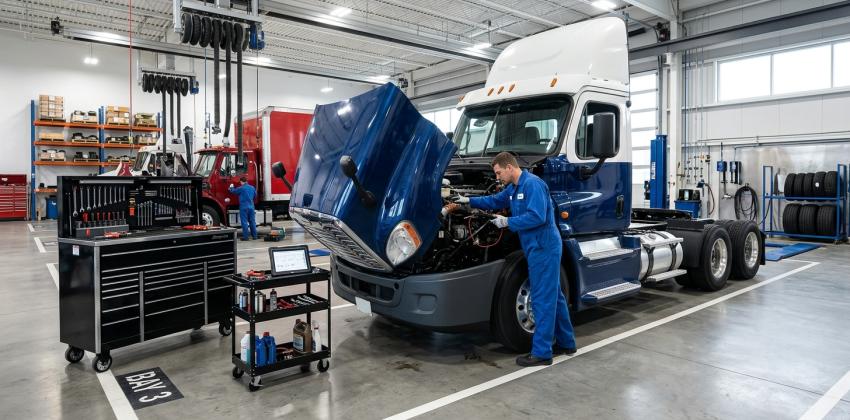
A heavy-duty repair shop rarely has the luxury of treating every job as a simple, predictable task. A truck may arrive with an urgent fault, another vehicle may be waiting for parts, and a technician may discover additional damage after beginning an inspection. Meanwhile, service advisors need to communicate with customers, managers must prioritize available labor, and the office needs accurate records of estimates, approvals, and invoices.
When these responsibilities are managed through disconnected systems or informal conversations, small oversights can create larger delays. A missing approval can leave a technician waiting. An incomplete work order can lead to repeated questions. A parts update that never reaches the service desk can make a realistic completion estimate difficult to provide.
Effective workflow management helps a shop coordinate these moving parts without adding unnecessary administrative pressure. With clear processes, reliable information, and suitable digital tools, heavy-duty repair businesses can improve visibility, make better decisions, and keep work progressing from vehicle arrival to final delivery.
For shops evaluating repair shop management software, the goal should be more than replacing paperwork with screens. The real opportunity is to connect the steps of a repair job so that everyone understands what has happened, what needs attention, and what must happen next.
Understanding the Workflow Behind a Heavy-Duty Repair
Every repair follows a sequence, even when the work itself is unpredictable. The vehicle is checked in, the concern is documented, an inspection is completed, an estimate is prepared, authorization is obtained, work is assigned, parts are sourced, and the finished job is reviewed before billing and release.
The difficulty is that these stages rarely operate in isolation. A change in one area can affect several others. For example, an inspection may reveal that a commercial vehicle needs additional components. The revised estimate must reach the customer, approval must be recorded, and the parts department must confirm availability before the shop can confidently plan the next steps.
A well-designed workflow makes these dependencies visible. Instead of relying on memory or scattered messages, employees can use a consistent process to record decisions and communicate changes.
This matters particularly in heavy-duty environments, where jobs may involve multiple technicians, specialized equipment, detailed labor requirements, and parts that are not immediately available. The objective is not to eliminate every interruption. It is to prevent avoidable confusion from making those interruptions worse.
1. Establish a Consistent Check-In Process
The repair process begins before a technician opens a toolbox. At check-in, the shop needs an accurate understanding of the vehicle, the reported concern, the customer's expectations, and any operational details that could influence the repair.
A rushed intake can create problems throughout the job. If a complaint is recorded vaguely, the technician may need to contact the service advisor for clarification. If the vehicle's identification or service history is incomplete, employees may spend time searching for information that should have been available from the beginning.
Create a standard intake procedure that captures the details relevant to the shop's work. This might include the vehicle identification, mileage or engine hours where applicable, reported symptoms, warning indicators, customer contact information, and the requested turnaround time. Photographs or inspection notes can also help preserve the vehicle's condition and the customer's original concern.
The process should be consistent without becoming unnecessarily complicated. A straightforward maintenance visit may require fewer details than a complex diagnostic job, so the intake system should allow additional information when the circumstances demand it.
Digital intake tools can make these records easier to retrieve later. When staff members can find the original complaint, attached inspection findings, and previous service information in one place, they have a stronger starting point for diagnosis and planning.
2. Turn Work Orders Into Clear Instructions
A work order should tell the team what needs to be done, why it is needed, and what conditions must be met before work proceeds. Simply recording a customer's complaint is not always enough to guide a technician through a complicated repair.
The service advisor should document the reported concern in plain, specific language. Once the inspection begins, findings should be recorded separately from the original complaint so that the shop can distinguish what the customer reported from what the technician observed.
For instance, a driver may report reduced engine performance. The inspection might identify a fault that requires further testing, but the final repair should not be assumed before the diagnostic process supports that conclusion. Recording each stage helps prevent an early suspicion from being treated as a confirmed diagnosis.
Useful work orders also make responsibility clear. If a job requires diagnostic testing, parts confirmation, customer authorization, and a road test, the team should understand which steps are pending and who is responsible for moving them forward.
What a useful work order should capture
The following details provide a practical foundation for consistent job management:
Vehicle and complaint details: Record the vehicle information, reported symptoms, and relevant operating conditions.
Inspection findings and requested work: Separate confirmed findings from items that require additional diagnosis or customer approval.
Assigned responsibilities and status: Identify the person or team responsible for the next action and record important changes.
Authorization and completion records: Keep approved work, additional requests, technician notes, and final checks connected to the job.
A complete record reduces the need for employees to reconstruct a job from memory. It also provides a clearer history when customers ask questions about the work performed or when the vehicle returns for related service.
3. Coordinate Technicians, Bays, and Priorities
A shop can have skilled technicians and the necessary equipment yet still struggle when assignments are poorly coordinated. One technician may be overloaded while another has capacity. A vehicle may occupy a service bay while waiting for parts, even though another job could use that space. Urgent repairs may interrupt scheduled work without a clear plan for handling the disruption.
Better scheduling begins with understanding the work, not simply filling the calendar. Managers should consider technician qualifications, estimated labor, equipment requirements, bay availability, job urgency, and the status of any dependencies. A repair involving specialized diagnostics, for example, should be assigned with the necessary tools and expertise in mind.
A digital scheduling board can help managers see which jobs are waiting, underway, blocked, or ready for inspection. Repair shop management software can be particularly useful when scheduling information is connected to work orders and job updates, rather than maintained in a separate document that employees must remember to update.
However, scheduling should remain flexible. Heavy-duty repairs can reveal unexpected problems, and estimated completion times are not guarantees. A realistic schedule gives managers room to reassess priorities when new information becomes available.
Separate urgent work from routine commitments
Not every vehicle should automatically move to the front of the queue because its driver is waiting. Managers need a consistent way to assess urgency, customer commitments, vehicle safety concerns, parts availability, and the impact of delaying other jobs.
A short daily planning discussion can establish the most important priorities. The team can review critical jobs, confirm who is available, identify blocked repairs, and decide whether assignments need to change. When priorities are adjusted, the reason should be communicated to the employees affected.
This approach helps the shop respond to urgent work without losing sight of existing commitments. It also gives service advisors more reliable information when customers ask for updates.
4. Make Parts Availability Part of the Repair Plan
Parts delays are not always preventable, but poor visibility can make them more disruptive. If a technician begins a repair before the required components have been confirmed, the vehicle may remain in a bay while staff members search for alternatives or wait for a delivery.
The parts process should begin as soon as the inspection identifies likely requirements. Employees can check existing inventory, confirm compatibility, contact suppliers, and record expected delivery dates. If a repair needs additional parts after disassembly, the updated requirement should be documented immediately.
Shops should also distinguish between parts that have been requested, ordered, received, and verified for the job. These statuses are different, and treating them as interchangeable can create misleading expectations.
A practical parts-management routine
Use a repeatable process to connect parts decisions with repair progress:
Confirm requirements early: Check specifications, quantities, and compatibility before committing to a repair schedule.
Track outstanding orders: Record supplier commitments and flag deliveries that may affect promised completion dates.
Reconcile received parts: Confirm that delivered items match the order and are assigned to the correct repair.
Communicate shortages promptly: Update the service advisor and manager when a missing component changes the job's expected timeline.
The aim is not to create extra paperwork. It is to make parts information available to the people who depend on it. When a delivery is delayed, the manager can reassess bay assignments, and the service advisor can provide a realistic update rather than waiting for someone to discover the problem.
5. Keep Customers Informed Without Interrupting the Shop
Customers operating commercial vehicles often need more than a general assurance that repairs are underway. They may be coordinating drivers, planning routes, arranging replacement vehicles, or managing maintenance budgets. A useful update explains the current situation and identifies any decision required from the customer.
Communication works best when it follows meaningful milestones. The shop might provide an update after the initial inspection, when an estimate is ready, when additional work requires authorization, when parts availability changes, and when the repair passes its final checks.
Each message should distinguish confirmed information from an estimate. If a supplier has not confirmed a delivery date, the shop should not present a speculative arrival time as a promise. If diagnostic testing is incomplete, the customer should understand that the repair recommendation may change.
A shared communication record also prevents different employees from giving conflicting answers. Service advisors should be able to review what has already been explained, which work has been authorized, and whether the customer has requested a particular contact method.
For many businesses, repair shop management software can help connect customer communications with the relevant work order, making it easier to maintain a consistent record. The software is only part of the solution, though. Employees still need clear guidelines about who communicates with customers, when updates are expected, and how urgent questions should be handled.
Questions to ask before choosing a platform
During a software evaluation, managers should consider whether employees can navigate the system easily, whether it supports the shop's current processes, and whether important information remains accessible throughout a repair. They should also ask about data migration, permissions, training, reporting, support, and any integrations the business requires.
The most suitable repair shop management software should reduce unnecessary handoffs and duplicate entry. It should make it easier to understand job status, identify outstanding decisions, and maintain accurate records. A long feature list is less valuable if employees cannot use those features consistently in everyday work.
A realistic demonstration is more useful than a presentation built around ideal conditions. Ask the provider to walk through a job that includes an unexpected inspection finding, a revised estimate, a parts delay, an authorization, and final invoicing. That scenario reveals how the platform handles the changes that make real workshop operations challenging.
7. Measure Progress and Improve the Process
A workflow can appear organized while hiding recurring problems. Jobs may routinely wait for authorization, estimates may take too long to prepare, or completed repairs may remain open because final documentation is missing. Managers need a way to identify these patterns without turning every employee interaction into a performance review.
Start by examining a few operational measures. The time between vehicle check-in and inspection, the number of jobs waiting for approval, repairs blocked by parts, schedule changes, and delays between job completion and invoicing can reveal where work is getting stuck.
The context behind each measure matters. A complicated engine repair should not be compared directly with a routine service job, and a delayed repair may reflect a customer decision or supplier problem rather than poor technician performance. Data is most useful when it helps managers ask better questions.
A simple routine for continuous improvement
Review active jobs daily: Identify work that has stopped progressing, determine the reason, and assign the next action.
Discuss recurring delays weekly: Look for repeated issues involving approvals, parts ordering, scheduling, documentation, or communication.
Refine one process at a time: Test a practical change, explain it to the team, and assess whether it reduces the original problem.
Check the results with employees: Ask technicians and service advisors whether the change improves their work or introduces new complications.
These reviews should lead to specific decisions. If vehicles regularly wait for estimates, the shop might establish a dedicated inspection and estimate window. If billing is delayed because labor notes are incomplete, managers might introduce a short documentation check before a job is marked complete.
Consistent improvement is more sustainable than repeatedly introducing new procedures without evaluating their results. It also helps employees understand that workflow changes are intended to remove obstacles, not simply add oversight.
8. Introduce Workflow Changes Without Disrupting the Team
Even a useful process can fail if employees do not understand how to follow it. A new digital system, for example, may initially slow the shop down if technicians are expected to learn unfamiliar screens while managing a full workload.
Before implementation, explain the problem the change is meant to solve. Show each role how the new process affects its responsibilities, and provide practical examples based on jobs the team commonly handles. Service advisors may need training on estimates and approvals, while technicians may need guidance on recording findings and updating job status.
If a shop is moving from paper records or spreadsheets, begin with a defined group of workflows rather than changing every procedure at once. Test the process, collect feedback, and correct confusing steps before expanding it across the operation.
Management should also establish clear rules for maintaining accurate records. If employees continue updating a paper board while someone else updates the digital system, the shop may end up with two conflicting versions of the truth. Choose a primary recordkeeping method and make responsibilities explicit.
For businesses adopting repair shop management software, successful implementation depends on the combination of suitable technology, consistent procedures, and employee participation. The system should support a clear operating model rather than being expected to fix unclear responsibilities on its own.
Frequently Asked Questions
What causes workflow delays in heavy-duty repair shops?
Common causes include incomplete work orders, delayed customer approvals, unavailable parts, scheduling conflicts, and unclear responsibility for the next step. Reviewing recurring delays helps managers address their underlying causes rather than repeatedly reacting to individual problems.
How can a repair shop improve technician productivity?
Managers can improve working conditions by assigning jobs according to skills and available capacity, confirming parts requirements early, documenting diagnostic findings clearly, and minimizing interruptions caused by missing information. Productivity should be evaluated alongside repair quality and safety.
Is digital work order tracking useful for smaller shops?
Yes, when the system matches the shop's actual needs. Even a smaller operation can benefit from consistent job records, clear approval status, accessible service history, and better visibility into work waiting for parts or customer decisions.
What should a shop look for in heavy-duty repair software?
Evaluate work order management, technician and labor records, parts tracking, estimates, invoicing, reporting, usability, and the integrations required by the business. Confirm the provider's current capabilities through a practical demonstration based on the shop's own workflows.
How can managers tell whether a workflow change is working?
Compare relevant measures before and after the change, such as jobs delayed by missing approvals, parts-related interruptions, documentation corrections, and time between completed work and invoicing. Consider job complexity and employee feedback before drawing conclusions.
Conclusion
A productive heavy-duty repair shop depends on more than technical expertise. It needs a reliable way to coordinate vehicle intake, inspections, work orders, scheduling, parts, customer decisions, and final billing. When these activities follow a clear process, employees spend less time chasing information and more time moving repairs toward completion.
The best improvements often begin with everyday problems: an approval that gets overlooked, a parts delivery nobody has checked, or a work order that does not explain the next step. Addressing these issues individually and then connecting the processes creates a stronger foundation for consistent operations.
Fullbay is one option for shops evaluating digital tools for heavy-duty repair management. Whatever platform a business chooses, the priority should remain the same: accurate records, clear responsibilities, timely communication, and workflows that reflect the realities of the workshop. With those foundations in place, a shop can manage changing workloads more confidently while delivering a more organized repair experience.