Video conferencing has become a normal part of modern workplaces. Teams now collaborate across offices, cities, and countries, making the quality of virtual meetings increasingly important. While a basic webcam can support a video call, modern meeting spaces often require more intelligent technology that can capture people, spaces, and conversations more naturally.
This is where a Dual-Camera AI Video Bar can make a difference.
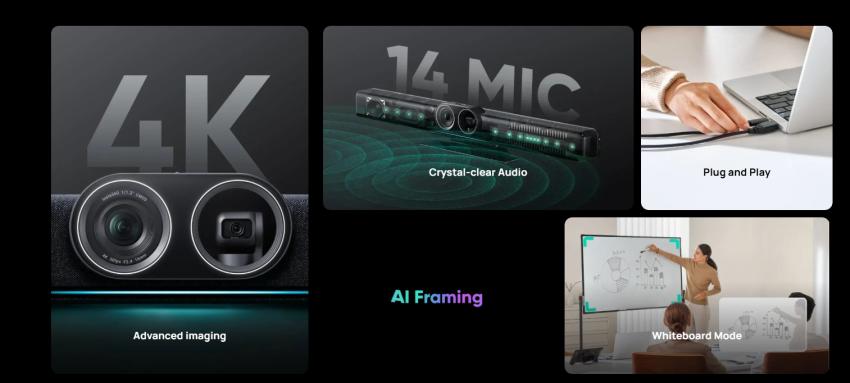
Combining two cameras with intelligent video capabilities, microphones, speakers, and meeting-room functionality in a single device, a dual-camera video bar can simplify conferencing while creating a more engaging experience for both in-room and remote participants.
What Is a Dual-Camera AI Video Bar?
A Dual-Camera AI Video Bar is an all-in-one conferencing device that uses two camera systems to provide more flexible video coverage.
Instead of relying on a single fixed camera, the dual-camera design can allow the system to capture different perspectives of a meeting room. Depending on the technology, one camera may provide a wider view of the room while another focuses on participants or specific areas.
AI-based features can then help the system intelligently adjust framing, tracking, and other aspects of the meeting experience.
The result is a setup that requires fewer separate components while providing a more dynamic video experience.
Why Are Two Cameras Useful?
A single camera can sometimes struggle to show both the entire room and individual participants clearly.
Imagine a conference room where six people are sitting around a table. A wide camera view may show everyone, but people at the far end of the table could appear relatively small. Zooming in may improve individual visibility but reduce the overall room context.
Two cameras can help address this challenge.
One camera can provide a broader perspective, while another can offer a closer or alternative view. Intelligent software can determine how these views should be used depending on the meeting.
This can make conversations feel more natural because remote participants can see the room and the people speaking without constantly switching views manually.
AI Makes Video Conferencing More Intelligent
The biggest difference between a traditional camera and an AI-enabled video bar is how the system responds to the meeting.
AI can support features such as:
Automatic participant framing
Speaker tracking
Intelligent camera switching
Group framing
Face or person detection
Automatic composition
Dynamic room coverage
These capabilities can reduce the need for participants to manually control the camera.
Instead of worrying about whether everyone is visible, meeting participants can focus on the discussion.
Automatic Framing for Better Visibility
People do not remain perfectly still during meetings.
Participants may lean forward, move around the room, join or leave the table, or change seating positions.
Automatic framing can adjust the camera view to keep participants appropriately positioned within the frame.
This is particularly useful for meetings involving several people because the camera does not have to remain fixed on one composition.
The system can adapt as the meeting changes.
Speaker Tracking Can Bring Conversations to Life
One of the challenges of virtual meetings is knowing who is speaking.
In a physical meeting, participants naturally look toward the person talking. Remote participants do not always have the same experience.
AI-powered speaker tracking can help address this by identifying the active speaker and adjusting the video framing accordingly, depending on the system's capabilities.
Instead of showing the same wide shot throughout the meeting, the camera can provide a closer view of the person currently contributing to the conversation.
This can make virtual discussions feel more interactive.
Better Experiences for Hybrid Meetings
Hybrid meetings bring together people who are physically present in a room and people joining remotely.
This can create an imbalance.
People in the room can see and hear one another naturally, while remote participants may receive a limited camera view or struggle to follow conversations.
A well-designed video bar can help reduce this gap.
By combining multiple camera perspectives with microphones, speakers, and intelligent video processing, the system can help remote participants feel more connected to the physical meeting.
This is particularly valuable for organizations that regularly combine office-based and remote teams.
Integrated Audio Reduces Equipment Clutter
A major advantage of an all-in-one video bar is integration.
Instead of installing a separate webcam, microphone, speaker, and other conferencing components, many video bars combine these functions into one device.
This can reduce the amount of equipment required in a meeting room.
It can also simplify installation and day-to-day operation.
For smaller meeting rooms, this can be especially useful because there may be limited space for multiple devices.
Microphones Matter as Much as Cameras
Good video is only half of a successful online meeting.
Poor audio can make even a high-quality video conference frustrating.
A video bar with integrated microphones can help capture voices from across the meeting space, depending on the room size and microphone design.
Features such as microphone arrays, noise reduction, echo cancellation, and beamforming can help improve voice clarity.
This is particularly important in offices where background conversations, keyboards, air conditioning, and other sounds may affect audio quality.
Intelligent Audio Processing
Modern conferencing systems can use audio processing technologies to make conversations easier to follow.
Noise reduction can help minimize unwanted background sounds, while echo cancellation can reduce feedback between microphones and speakers.
Some systems can also focus on voices coming from particular directions.
These technologies work in the background, allowing participants to communicate without constantly adjusting microphones or audio settings.
Suitable for Different Meeting Spaces
A Dual-Camera AI Video Bar can be used in different types of environments.
- Small Meeting Rooms: Small rooms can benefit from the simplicity of an all-in-one conferencing device. A single unit can provide video, audio, and intelligent framing without requiring a complex installation.
- Medium Conference Rooms: Medium-sized rooms may benefit from wider camera coverage and more advanced participant tracking.
- Huddle Spaces: For quick team discussions, a video bar can provide a simple way to start a meeting without setting up multiple pieces of equipment.
- Training and Collaboration Spaces: The ability to capture multiple people and perspectives can also be useful for training sessions, workshops, and collaborative discussions.
- Simplifying Meeting Room Design: Meeting room technology can become complicated when every component is purchased and installed separately.
You may need:
Cameras
Microphones
Speakers
Displays
Connectivity equipment
Control systems
Cables
Mounting hardware
An integrated video bar can reduce some of this complexity.
This does not mean every meeting room needs exactly the same equipment. Instead, organizations can choose an appropriate setup based on room size, meeting style, and user requirements.
What Should You Look for in a Dual-Camera Video Bar?
Before selecting a device, consider more than just the number of cameras.
- Camera Quality
Look at resolution, field of view, low-light performance, zoom capabilities, and image processing.
- AI Features
Consider whether the system supports automatic framing, speaker tracking, group framing, or other intelligent functions that are genuinely useful for your meetings.
- Microphone Coverage
Check whether the microphone system is appropriate for the size of the room.
- Speaker Performance
Clear audio output is essential for remote participants to be heard naturally.
- Platform Compatibility
Make sure the device works with the video conferencing platforms your organization already uses.
- Installation
Consider mounting options, cable management, power requirements, and network connectivity.
- Room Size
A solution designed for a small meeting room may not provide sufficient coverage for a large conference room.
Is a Dual-Camera Video Bar Worth Considering?
The answer depends on how your organization conducts meetings.
If most meetings involve one or two people sitting in front of a laptop, a basic webcam may be sufficient.
However, if several people regularly participate from a conference room, a more intelligent system can provide a significantly better experience.
The ability to combine two camera perspectives, intelligent framing, high-quality audio, and integrated functionality can make meetings easier to manage and more engaging for remote participants.
The Future of Meeting Rooms Is Becoming More Intelligent
Meeting-room technology is moving beyond simply transmitting video and audio.
Modern systems are increasingly designed to understand the environment around them. Cameras can identify people, microphones can distinguish voices from background noise, and AI can help determine how participants should appear on screen.
This shift is changing the role of conferencing equipment.
Instead of asking participants to control the technology, the technology is increasingly adapting to the participants.
Final Thoughts
A Dual-Camera AI Video Bar combines multiple important conferencing functions into a single intelligent solution.
Its dual-camera approach can provide greater flexibility than a traditional single-camera setup, while AI-powered features can help frame participants, follow conversations, and create a more natural meeting experience.
For businesses investing in hybrid collaboration, the goal should not simply be to add more technology to meeting rooms. The goal should be to create an environment where technology quietly works in the background and allows people to concentrate on communication.
When cameras, microphones, speakers, and AI work together effectively, a meeting room can become more than a place for video calls—it can become a connected collaboration space designed for the way modern teams actually work.