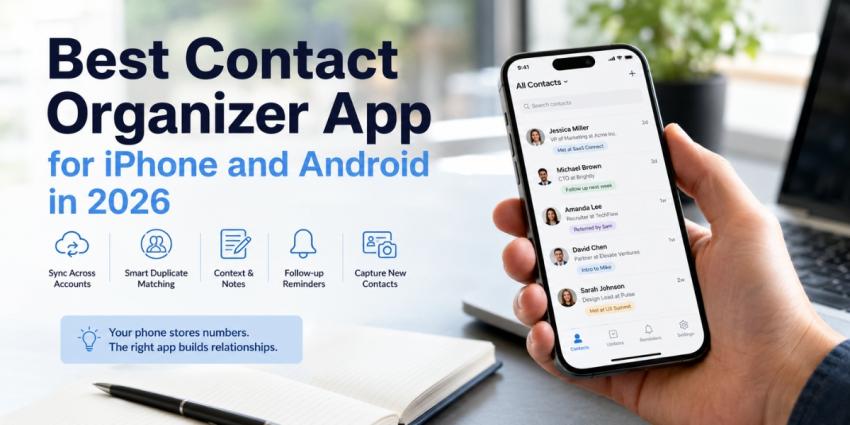
Your phone's default contacts app was built to store numbers, not relationships. Here's what people use instead.
That distinction is why the best contact organizer app category exists. Apple Contacts and Google Contacts are storage. They hold a name, a number, maybe a job title that was accurate three employers ago. What they don't do is tell you who you actually owe a reply to, which of these 2,300 entries you've spoken to this year, or where you met the guy listed only as "Dave — conference."
I've spent years watching sales teams, founders, and recruiters hit the same wall. The address book keeps growing, and the useful information inside it keeps shrinking. Below are the tools that actually fix that, what each one costs, and — honestly — which problem each one does not solve.
Why Does Your Default Contacts App Stop Working?
Stock apps are not badly designed. They are made to do specific jobs.
Apple has released real cleaning tools. Open Contacts on an iPhone, then tap Merge All or My Card to view matches one at a time under View Duplicates. For entries that don't match right away, Link Contacts is another option. The catch is in the tiny print: duplication detection activates only for cards with the same first and last names. "Rob Kearns" and "Robert Kearns" are forever separate unless you manually join them.
Google Contacts works the same way through Merge & fix on the web or Fix & manage on Android — with one hard limit worth knowing before you rely on it: you can't merge contacts saved in different Google Accounts. If your work and personal accounts both hold half a version of the same person, Google won't touch it.
The decay issue is another issue that no merge tool can solve. As of January 2024, the median employee tenure was 3.9 years, the lowest since 2002 and down from 4.1 in 2022, according to the US Bureau of Labor Statistics. Individuals move. Within a year, a significant portion of titles, work emails, and desk numbers in a thousand-contact address book are subtly incorrect. With complete trust, your phone will keep showing them to you.
So the real question isn't which app has a nicer interface. It's which of two problems you have: a messy archive that needs cleaning, or new people arriving faster than you can file them.
What to Look for in the Best Contact Organizer App
A real update differs from a skin over your current address book in five ways:
Syncing across accounts. Instead of creating a sixth silo, it could combine iCloud, Google, and Microsoft into one perspective.
Fuzzy duplicate matching. Exact-name matching is what your phone already does badly.
Context fields. Notes, tags, and a record of when you last spoke — the things that make a contact useful six months later.
Follow-up reminders. Storage without prompts means forgetting more neatly.
A capture path. How does a new person get in? If the answer is "type it," you'll stop within a week.
That last point is the one most buyer's guides skip, and it's usually the one that decides whether you're still using the app in March.
The Best Contact Organizer Apps for iPhone and Android in 2026
RoloScan — best for capturing new contacts and actually following up
Most apps in this category assume the contact is already on your phone. RoloScan, built by Sidecar AI, works on the step before that — the moment you're standing in front of someone holding a card or a badge, and the information has to get somewhere better than a jacket pocket.
You use the web dashboard or the mobile app to scan a business card or event badge. In only a few seconds, AI-powered OCR extracts the name, email, firm, and other information. It then adds more corporate and profile context to the record. The contact then lands in the system your team already uses rather than creating another isolated list because it syncs into Salesforce or HubSpot via secure OAuth connections.
Three things make it a different proposition from the cleanup tools further down this list.
It writes the follow-up while the conversation is still fresh. RoloScan generates tailored email drafts, LinkedIn connection prompts, and meeting reminders from the context attached to each capture. You add a quick note at the booth — "evaluating a switch, needs it live before Q3" — and the draft references it, so the message reads as if it came from someone who was listening, not a mail merge.
When the venue's Wi-Fi isn't working, it is. When you're back online, the device syncs the queues that were captured in offline mode. Anyone who has worked in the basement of a convention center understands the significance of that.
It handles duplicates at the source. If three people from the same team scan one prospect, RoloScan consolidates them rather than creating three competing records — the point at which most address books start degrading. You can also choose between individual and team mode, so a solo founder and a six-person booth crew can both use it sensibly.
Where it fits: RoloScan is a capture-and-follow-up tool, not a phone address-book cleaner. If your problem is 4,000 old iCloud entries, start with ContactsPlus below. If your problem is that every event, conference, or coffee meeting produces people you never properly file, this is the gap it closes — and it's on both the App Store and Google Play, with $50 early-access beta pricing currently available through the site.
ContactsPlus — best for cleaning up a messy address book
Formerly FullContact, ContactsPlus is the most direct answer to "my contacts are a disaster across four accounts." It unifies Google, iCloud, and Outlook into one address book, automatically detects and merges duplicates, enriches records with updated photos, titles, and social profiles, and runs on web, iOS, Android, Chrome, and Mac. Auto-merge and activity history — with every merge undoable in a click — are what earn the subscription.
Covve — best mobile-first personal CRM
Covve is a polished personal CRM with a well-regarded card scanner, stay-in-touch reminders, and news alerts about your contacts' companies. Two caveats before you commit: the free tier caps at 20 contacts, which is too small to properly evaluate anything, and Covve is mobile-only on iOS and Android — no web app, no desktop client. If you work primarily from a laptop, you'll be reaching for your phone to log every interaction.
Dex is ideal for networks with a lot of LinkedIn users
In the personal CRM area, Dex boasts the most integration surface, including pre-meeting brief emails, a card scanner, Gmail, Outlook, calendars, iMessage, WhatsApp, and LinkedIn (with job-change alerts). It's the best option if you want self-sustaining reminders and your network actually uses LinkedIn. Although Dex's own staff warns that pricing and plan limits in this category change frequently, check the current page before you buy. Paid plans are in the low teens per month, with a free tier accessible.
Cardhop — best iPhone and Mac power tool
Cardhop is a genuine upgrade to Apple Contacts rather than a CRM: natural-language parsing, quick actions, relationship and org-chart views, and home screen widgets for frequent contacts. A free version exists; the premium features unlock through a Flexibits Premium subscription, which also bundles the Fantastical calendar app and Fantastical Scheduling. The obvious limitation for this list — it's Apple-only. No Android version exists, so it's out if your team is mixed.
The best free place to start is Google Contacts.
It's better than most people realize, free, and already installed. Merge & Fix handles duplication, labels give you rough segmentation, and syncing across iOS, Android, and the web is reliable. Once you've used it as your storage layer, add something more clever on top. Just remember that there are restrictions on cross-account merging.
How to Declutter Phone Contacts Before You Switch
Migrating a mess produces an organized mess. Spend an hour on this first.
Export a backup from Google Contacts on the web or iCloud.com before you touch anything. Merges are hard to reverse in the native apps.
Reduce to a single primary source. Give only one account contact access on the iPhone by going to Settings> Contacts> Accounts. The biggest source of duplication is when many accounts sync at the same time.
Run the native merge first. Clear the easy matches with View Duplicates or Merge & fix so your new app isn't billing you to fix what was free to fix.
Delete rather than archive. If you can't place the name and there's no note, no company, and no interaction in five years, it isn't a contact — it's noise that makes search worse.
Next, adjust the intake. Prior to the next meeting or event, decide how new attendees will be admitted. Whether you undertake this cleansing again in eighteen months depends on that choice.
Conclusion
There is a best contact organizer software for the issue you are facing, not just one. ContactsPlus is the sensible purchase if you're overwhelmed by duplicates across accounts. Both Covve and Dex are excellent choices if you want a relationship tracker that pushes you; Covve excels in mobile polish, while Dex excels in integrations. Cardhop, which is exclusive to Apple, is fantastic. Google Contacts is an excellent free floor.
But cleaning is maintenance, and maintenance never stops. Contacts that are entered wrongly, either hastily or not at all, almost always end up chaotic. Because it works at that entrance point—scanning, enriching, syncing to your CRM, and drafting a follow-up while the person still recalls meeting you—RoloScan is worth checking out. If input is fixed, the yearly cleanup is mostly rendered unnecessary.