

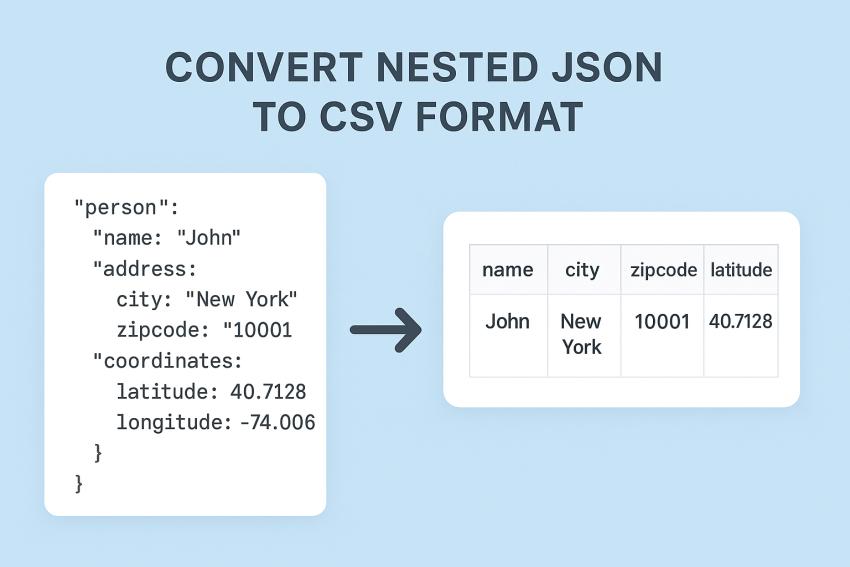
In today’s emerging world, converting JSON file to CSV is a common challenge faced by many users who work with complex or large datasets. Nest JSON obtains arrays and objects, which are mainly used in web applications and APIs. The need to convert JSON to CSV can make the data more accessible and compatible with other platforms. This situation arises for data migration, reporting, or analyzing data that can be human-readable. The simplicity of CSV makes it ideal for structured data analysis. In this guide, we’ll explore the best techniques to convert nested JSON to CSV file efficiently. Let’s move down for further discussions.
Why Convert Nested Data to CSV Format?
This conversion is an important step for several users who need to process data easily and make it compatible with various tools. While JSON stores structured data but it is machine-friendly, and CSV is a universally accepted format. Here are some reasons:
- Data Analysis
CSV’s tabular format makes it easier to analyze data in spreadsheet tools like Excel and Google Sheets. It enables calculations, reporting, and trend visualization.
- Compatibility
CSV is widely supported across different software and systems. This support ensures easy data import, export, and sharing without any compatibility issues.
- Efficiency
CSV simplifies handling and processing large datasets. It is easier to work with than complex, nested JSON files.
Common Challenges When Converting JSON File to CSV
When the user wants to convert nested JSON to CSV, they face several hurdles due to inherent differences between the two file formats. JSON is designed to represent complex and raw hierarchical structures, whereas CSV is flat and best suited for tabular data. These challenges mainly arise because of the following reasons:
1. Loss of Data
The process of flattening nested JSON often brings about the loss of a hierarchical relationship or nested data. This is potentially problematic if multi-level arrays or objects are reduced to a single row.
2. Difficult Mapping
JSON with multiple layers of nesting can be complicated to map out to a flat CSV format. Processing the data to be placed in the appropriate columns and ensuring that relationships between fields are maintained in the output will require complex mapping logic and diligence.
3. Inaccurate Data
Changes to the structure in the JSON (e.g., different field names, missing data, or changes to the nesting) can complicate the process of transforming the data to a new flat CSV format.
How to Convert Nested JSON to CSV File? 2 Best Ways
Moving the JSON file into tabular format is a valuable process that helps you view and understand the data it contains. Whether you are working with configuration files or exported datasets, formatting the JSON and saving it as CSV file is efficient. So, in this section, we’ll explore the 2 best methods through which the process of conversion can be done smoothly. Now, let’s dive into it.
Method 1: Convert JSON to CSV File - Python Solution
Python is one of the useful methods for developers who know coding languages because it is a code-based solution. It requires the pandas library to start the process of converting JSON to CSV format. Follow the steps given below:
- Install and import the Python libraries.
- Browse your JSON file into it.
- Generate the code to create CSV file.
PROS:
- Handle large JSON files easily.
- Provides flexibility for cleaning and transforming data.
- Beneficial for technical users.
CONS:
- This method is useful only for tech-savvy users who prefer coding.
- Sometimes need extra steps for deeply nested JSON files.
- Time-consuming method for non-technical users.
Method 2: Convert Nested JSON File to CSV Format - Pro Solution
Many users need a quick and reliable solution that converts complex or large JSON to CSV formats easily. Here is a professional SysTools JSON Converter Tool that provides an efficient way to convert nested JSON into a tabular file without any data loss. It is an offline tool that handles large, complex, and nested structured JSON files. This is a robust tool that preserves data accuracy and structure during conversion. Below are its working steps and key features of using this advanced tool.
Steps to Convert JSON File to Plain Text:
- Download and run the above-mentioned tool on your system.
- Browse and upload the JSON file.
- Choose CSV as the file format and hit the Export button.
- Lastly, tap on View Report and view your converted plain CSV file.
PROS:
- This tool lets you convert nested JSON to CSV or other formats easily.
- It manages nested objects and arrays automatically.
- You can convert multiple files at the same time, as it supports batch conversion.
- It keeps data accuracy and structure during conversion.
- It always ensures that your data is secure and reduces the risk of data loss or file corruption.
Best Practices
- Always ensure that JSON file is well-organized with consistent key values.
- Validate your raw data before conversion by removing duplicate entries.
- After conversion, review the CSV file format to prevent formatting issues.
Time to Wrap Up
In this comprehensive guide, we have explored the best 2 methods to convert nested JSON to CSV format. Both methods are highly effective, but one is code-based, which is useful only for technical users, whereas the other solution is simple and easy and can be used by both professionals and individuals. Try to choose that technique which suits your needs and preferences.



