Introduction
Are you tired of encountering SSL Pinning obstacles when trying to access your favorite apps or websites on Android? Don't worry, you're not alone. SSL Pinning is a security feature that can sometimes become more of a hindrance than a help. But fear not, because in this blog post we will guide you through everything you need to know about bypassing Android SSL Pinning and provide you with some essential tools to make the process easier. So sit back, relax, and get ready to learn how to overcome those pesky SSL Pinning challenges once and for all!
What is SSL Pinning?
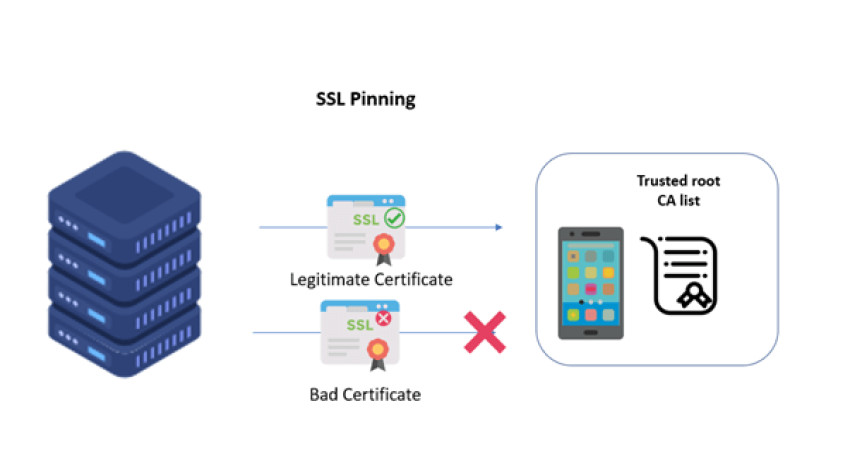
SSL Pinning is a security mechanism that prevents man-in-the-middle attacks and ensures the authenticity of HTTPS connections. It involves verifying the SSL/TLS certificate presented by the server matches a known or expected value stored on the client-side, rather than relying solely on trusted Certificate Authorities (CA).
To understand how this works, it's essential to know that SSL certificates are used to establish secure communication between clients and servers over insecure networks like public Wi-Fi. These certificates contain information about who owns the website being visited, which CA issued it, its expiration date, and more.
When an app uses SSL pinning, it compares the server's certificate with its own copy instead of trusting any CA-signed certificate blindly. This technique makes it much harder for attackers to intercept traffic and steal sensitive data like passwords or credit card numbers.
SSL pinning is an effective way to enhance your app's security posture against common cyber threats in today's digital world.
How does SSL Pinning work?
SSL Pinning is a security measure that ensures encrypted communication between two parties. It prevents Man-in-the-Middle attacks by verifying the identity of the server, ensuring users connect to the intended website and not an imposter.
In SSL Pinning, an application hardcodes the digital certificate or public key of a specific server in its code. The next time you try to access it, your device will verify whether the server's digital certificate matches with what was hardcoded in the app. If there is a mismatch, then your device will terminate communication.
The process starts when you request HTTPS page from a secure server using an HTTP client on your mobile device. The client checks if it has cached any certificates for this host or domain name before initiating SSL handshake protocol with TLS/SSL-enabled webserver.
After successful verification of all parameters including root CA signatures chain validation and expiry date check-up; both parties initiate symmetric encryption (e.g., AES) session keys exchange through asymmetric encryption algorithms like RSA.
By hardcoding certificates into their app, developers can prevent attackers from intercepting traffic between users' devices and servers they are communicating with over HTTPS. However, this approach also causes problems since legitimate certificates may expire or change due to other reasons such as updates made by site admins themselves - which could cause issues during app operation without proper handling by developers updating their code accordingly
Bypassing Android SSL Pinning
Bypassing Android SSL pinning is the process of defeating the security measures put in place to protect communication between an app and a server. It's used by developers to ensure that their apps can securely communicate with servers without any third-party intervention.
SSL pinning is an essential security measure for mobile applications, but it can be bypassed by hackers who want to access sensitive data or manipulate the application's behavior. However, bypassing SSL pinning requires technical knowledge and advanced tools.
To bypass Android SSL pinning, you need to disable certificate validation in your device settings or install custom certificates on your device. This process is not recommended for non-technical users as it may expose them to various security risks.
There are several tools available for bypassing Android SSL pinning such as Frida and Cydia Substrate which allows you to hook into the application code and modify its behavior at runtime.
However, bypassing Android SSL Pinning should only be done if absolutely necessary since it compromises security protocols implemented by developers.
Tools for Bypassing Android SSL Pinning
There are several tools available for bypassing Android SSL Pinning that can make the process easier and more efficient. One of the most popular tools is Frida, an open-source dynamic instrumentation toolkit. It allows users to intercept function calls and manipulate them in real-time.
Another tool that can be used for bypassing SSL Pinning on Android devices is Xposed Framework. This framework allows developers to create modules that can modify the behavior of third-party apps without requiring any modifications to their source code.
Moreover, Cydia Substrate is another powerful tool for bypassing Android SSL Pinning. It works by injecting a hook into the target application's code, which then redirects traffic through a proxy server before it reaches its intended destination.
In addition, Objection is another great option for those looking to bypass SSL pinning on Android devices. It provides various features such as runtime exploration and manipulation using different techniques like Frida script injection or Cycript dynamic analysis.
These tools have made it much easier for researchers and security professionals to test the security of mobile applications by allowing them to inspect network traffic from within an app without having to reverse engineer or decompile its code first.
Why Would You Want to Bypass It?
There are several reasons why someone would want to bypass SSL pinning on an Android device.
It is important to note that SSL pinning is a security measure designed to protect sensitive information from being intercepted and manipulated by attackers. However, in some cases, developers may implement SSL pinning in a way that prevents legitimate use of the application.
For example, let's say you are trying to conduct research on an app that uses SSL pinning. By bypassing this feature, you can access the app's traffic data and analyze how it functions without any hindrances.
Another reason could be for debugging purposes. If you encounter errors while working with an app that implements strict SSL pinning protocols, you may need to temporarily disable them in order to perform necessary tests or make changes.
It is worth noting that bypassing SSL pinning should not be taken lightly as doing so can expose sensitive user data and leave devices vulnerable to cyber attacks. It should only be done for legitimate purposes by those who have the proper knowledge and expertise in cybersecurity.
Tampering with the Root Certificate
When it comes to bypassing SSL Pinning on Android devices, one approach that can be taken is tampering with the root certificate. This involves modifying the trusted root certificate store on the device so that a custom certificate can be used instead of the one provided by the server.
This method allows for a man-in-the-middle attack, where an attacker intercepts communication between two parties and alters it without their knowledge. By using a custom root certificate, an attacker can generate fake certificates for any website they choose, allowing them to intercept sensitive information such as login credentials or credit card numbers.
However, this technique requires access to the user's device and administrator privileges in order to modify the trusted root certificate store. It also leaves traces behind that can be detected by security software and may alert users of suspicious activity.
Tampering with the root certificate is a powerful but risky approach to bypassing SSL Pinning and should only be attempted by experienced professionals with legitimate reasons for doing so.
Conclusion
SSL pinning is an important security feature that protects mobile applications from man-in-the-middle attacks. However, in certain situations, developers may need to bypass it for testing or debugging purposes. While there are various tools available to bypass Android SSL pinning such as Frida and Xposed Framework, it's essential to use them responsibly and only when necessary. Tampering with the root certificate can have serious consequences and compromise the security of a device or application.
Understanding how SSL pinning works and why it's implemented is crucial for both developers and security experts. By staying up-to-date with new techniques for bypassing SSL pinning and regularly reviewing your app's security measures, you can create a more secure mobile experience for your users while still allowing flexibility in testing and development practices.