

A business card is often the first physical impression of your brand. Before you speak, your card already communicates your professionalism. While design and colors matter, one critical factor that many people overlook is the business card size.
Choosing the wrong size can affect readability, usability, and even your brand perception. A card that doesn’t fit properly in a wallet or looks cluttered can easily be ignored or discarded.
In this guide, you will learn everything about business card size, including dimensions in cm, inches, and pixels, along with expert tips to help you choose the perfect size.
What is Business Card Size? (Dimensions Explained)
Business card size refers to the standard dimensions used to design and print visiting cards. It defines how much space you have for content and how the card will fit into everyday use.
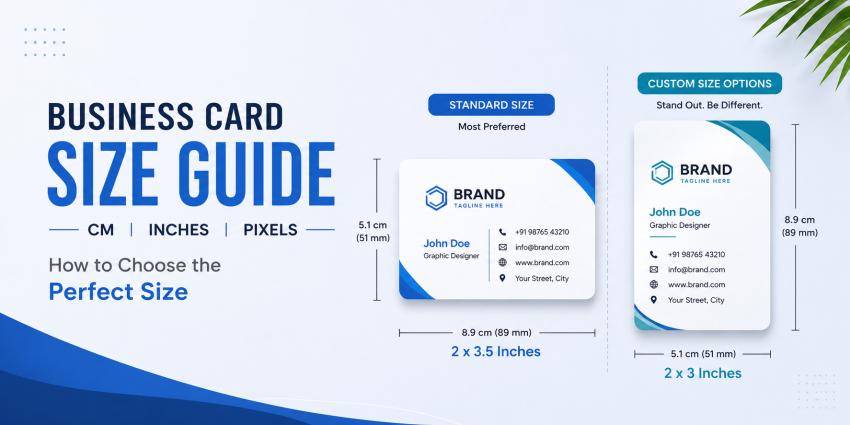
The standard business card size in India is 2 x 3.5 inches (51 x 89 mm).
This size is widely used because it fits easily in wallets, is easy to print, and provides a balanced layout for professional designs.
For a detailed explanation, you can also check this standard visiting card size in India guide.
Standard vs Custom Business Card Size
Standard Business Card Size
2 x 3.5 inches (51 x 89 mm)
This is the most commonly used size across industries.
Why Standard Size Works Best:
- Fits in wallets and cardholders
- Cost-effective printing
- Easy to design
- Professional look
Custom Business Card Size
Custom sizes are used when brands want to stand out visually.
Examples:
- Square cards
- Mini cards
- Oversized cards
When to Use Custom Sizes:
- Creative industries
- Premium branding
- Unique marketing campaigns
Expert Insight:
In real printing, custom sizes often lead to:
- Higher costs
- Cutting inconsistencies
- Alignment issues
For most businesses, standard size remains the safest and most effective option.
Business Card Size in CM, Inches & Pixels
Understanding different measurement formats is important for accurate design and printing.
Standard Dimensions:
UnitSize
Inches2 x 3.5 inches
CM5.1 x 8.9 cm
MM51 x 89 mm
Business Card Size in Pixels (300 DPI)
1050 x 600 pixels
Why 300 DPI Matters:
- Ensures sharp printing
- Prevents blurry text
- Maintains high-quality output
Common Mistake:
Designing in low resolution (72 DPI) results in poor print quality even if it looks good on screen.
How to Choose the Right Business Card Size for Your Business
Choosing the right card size depends on your business type and how you use the card.
Small Business Owners
- Use standard size
- Focus on clarity and readability
Corporate Professionals
- Minimal design
- Premium finish
Designers & Creative Brands
- Can experiment with layouts
- But must maintain usability
Key Factors to Consider:
- Will it fit in wallets?
- Is the text readable?
- Does it match your brand style?
Pro Tip:
A clean and well-structured standard card performs better than a complicated custom design.
Horizontal vs Vertical Business Cards
Horizontal (Landscape)
- Most common format
- Easy to read
- Safe for all industries
Vertical (Portrait)
- Unique and modern
- Works well for creative fields
- Requires careful layout planning
Recommendation:
Choose horizontal for safety and usability.
Choose vertical only if your design is strong and minimal.
Common Mistakes While Choosing Business Card Size
Using Incorrect Dimensions
Mismatch between design and print size causes scaling issues.
Ignoring Bleed Area
Leads to unwanted white edges after cutting.
Overcrowded Layout
Too much content reduces readability.
Low Resolution Design
Blurry output affects brand perception.
Wrong Printing Setup
Understanding business card size for printing is important to avoid:
- Cutting errors
- Alignment issues
- Design mismatches
👉 Even a 1 mm shift in printing can cut important text or logos.
Pro Tips for Perfect Business Card Design
Use Premium Material
Cards printed on 350 GSM cardstock:
- Feel durable
- Look premium
- Improve brand perception
Maintain Proper Margins
Keep text at least 3–5 mm away from edges.
Keep Design Clean
Minimal design improves readability and impact.
Use CMYK Color Mode
RGB colors may look different in print. Always design in CMYK.
Choose a Reliable Printing Partner
For best results, explore professional business card printing online options that ensure quality and precision.
Conclusion
Choosing the right business card size is essential for creating a professional and effective first impression. The standard size works best for most businesses because it is practical, affordable, and widely accepted.
Custom sizes can help you stand out, but they should be used carefully to avoid usability and printing issues.
A well-designed business card is not just a piece of paper — it is a reflection of your brand identity.


